
Why COD Orders Often Go Untracked
A Quick Look at Zotek COD Form
Before getting into the tracking problem itself, it helps to know how the Zotek COD Form works, since the fix depends on it. Zotek COD Form replaces Shopify’s default checkout with a 1-click form, shown either as a pop-up or embedded on the product page, so customers can place a cash-on-delivery order without going through Shopify’s standard checkout flow at all. Beyond the order form itself, it includes upsells, downsells, quantity offers, and bundles to grow order value, along with IP blocking and postal code restrictions to manage fake or low-intent orders.
Read more: How to Track Cash on Delivery Orders with Facebook and TikTok Pixel on ShopifyThat last detail, ordering without touching Shopify’s standard checkout, is exactly what creates the tracking problem most merchants don’t notice until they dig into their ad account’s reporting.
How Standard Pixel Tracking Is Built (and Where It Breaks for COD)
Facebook and TikTok both define a set of standard events that ad campaigns rely on for optimization and audience building. Two of the most important are Initiate Checkout, which fires when a customer begins the checkout process, and Purchase, which fires when an order is confirmed. Most pixel setups, including Shopify’s own native Facebook and TikTok sales channels, fire these events by watching Shopify’s standard checkout flow.
That works fine for customers paying by card through Shopify’s checkout. It runs into trouble for COD orders placed through a 1-click form on the product page, since that order never passes through the checkout pages the pixel is watching. The result is that Initiate Checkout and Purchase simply don’t fire for those orders. Your ad account still picks up the page view and maybe an Add to Cart, but the two events that matter most for campaign optimization and reporting are missing.
Read more: How to Track Cash on Delivery Orders with Facebook and TikTok Pixel on Shopify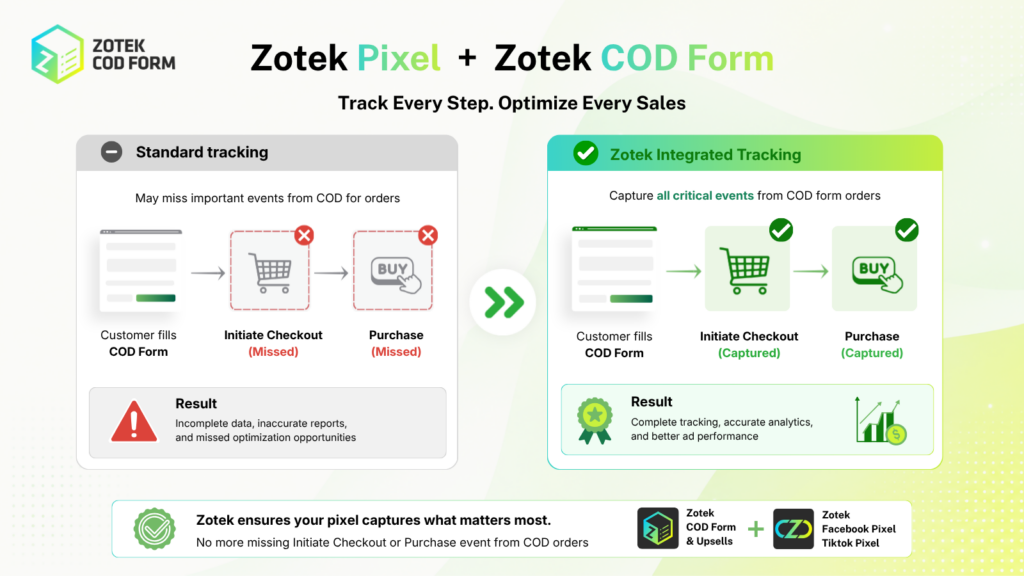
As the comparison shows, the gap isn’t in the ad platform itself. Facebook and TikTok both support these events correctly. The gap is in how the events get triggered, since most setups are wired to Shopify’s checkout rather than to the COD form that’s actually processing the order.
How the Zotek COD Form + Pixel Integration Closes the Gap
Zotek Facebook Pixel TikTok Pixel addresses this by listening directly to Zotek COD Form’s own events instead of relying only on Shopify’s checkout. When a customer starts filling out the COD form, the integration fires Initiate Checkout at that moment. When the order is confirmed, it fires Purchase, with the order value and product details attached, the same way it would for a prepaid order. This happens whether or not the order ever touches Shopify’s standard checkout pages.
Because both apps are built by the same team, this connection doesn’t depend on a separate piece of middleware translating one app’s data into something the other can read. The COD form and the pixel are designed to communicate with each other from the start.
What Complete Event Data Actually Changes for Your Ads
Closing this gap isn’t just a reporting nicety. It changes how your campaigns actually perform, in a few specific ways:
- More accurate ROAS reporting, since revenue from COD orders gets counted instead of disappearing from your ad account’s view.
- Better campaign optimization, since Facebook and TikTok’s delivery algorithms learn from Purchase events. If a large share of your real purchases never register, the algorithm is optimizing toward an incomplete picture of who actually buys.
- Stronger lookalike and retargeting audiences, since these are built from your purchasers’ data. A lookalike built only from card-paying customers looks different from one built from your full customer base, particularly in markets where COD dominates.
- Cleaner diagnostics in Meta Events Manager and TikTok Events Manager, since you’re no longer missing a structural slice of bottom-funnel events.
Zotek’s Integration vs. Pairing COD Form with a Separate Pixel App
This is the part worth understanding if you’re choosing COD form and pixel apps separately rather than as a pair.
Most third-party pixel apps and Shopify’s own native Facebook/TikTok sales channels are built to track Shopify’s standard checkout flow. That’s a reasonable design choice, since most Shopify stores sell exclusively through that checkout. But it means a generic pixel app paired with any COD form app, Zotek’s or a competitor’s, runs into the same blind spot described above, unless that specific pixel app has been built with explicit support for that COD form’s events.
Closing that gap without a native integration usually means custom development work: a webhook from the COD form, a script to translate its order data into Facebook and TikTok’s event format, and a server-side setup to send it reliably. That’s a realistic option for a merchant with in-house developers. For most small and mid-sized Shopify stores, it’s not something they’ll build and maintain over time.
Pairing Zotek COD Form with Zotek Facebook/TikTok Pixel skips that step, since the connection is native rather than bridged. There’s no webhook to configure and no event mapping to maintain. It’s worth being direct about the limit of this advantage too: it’s specific to these two apps working together. Using Zotek COD Form with a different pixel app, or a different COD form app with Zotek Pixel, won’t carry the same direct event connection unless that specific pairing has been built and documented.
Turning On the Integration
If you’re already running both apps, the setup itself is a short, one-time step:
- Open Zotek COD Form’s settings and go to the Integrations tab.
- Connect your Zotek Facebook/TikTok Pixel account. If you don’t have Zotek Pixel installed yet, you’ll be prompted to install it first.
- Place a test COD order in your store and confirm that Initiate Checkout and Purchase appear in the test events tool for Meta Events Manager and TikTok Events Manager.
- Repeat the test on mobile, as most COD shoppers are checking out on a phone.
Final Thoughts
If COD makes up a meaningful share of your orders, and for a lot of Southeast Asian and Middle Eastern merchants, it does, the connection between your COD form and your pixel matters as much as the ad creative itself. An ad account that only sees half your purchases can’t optimize for the customers you’re actually getting. Closing that gap is less about adding a new tool and more about ensuring the tools you already have actually talk to each other.