

What is Meta Pixel and How to Create One Step-by-Step
A significant element in your digital marketing strategy is setting up Facebook Pixel, which is now called the Meta Pixel because of Facebook’s rebranding. It enables you to monitor site visitors, observe how they convert, and enhance your Facebook advertising. You may utilize Meta Pixel to improve the performance of your advertisements by following our advice.
The key to understanding the behavior of your website’s users is the Meta Pixel. It keeps track of everything, including transactions and page visits. You may use this information to improve the effectiveness and focus of your Facebook advertising.
1. Definition of Meta Pixel.
An analytical tool called Meta Pixel allows you to monitor the actions of your website’s visitors. Facebook and Instagram users may be identified with the assistance of this code, which also shows how they engaged with your website’s content (page views, product views, adding to cart, beginning checkout, sales, etc.). This data may be utilized to target individuals with advertisements according to their online behavior, interests, and choices. It also lets you monitor the effectiveness of your ads.
2. How does Meta Pixel work?
In order to track users’ interactions with your company on and off Facebook and Instagram, the Meta Pixel sets and activates cookies. Meta is able to link website visitors to Facebook and Instagram accounts thanks to these cookies.
3. What are the benefits of using Meta Pixel?
- Track conversion: + See how people interact with your website after clicking your ads. + Track some specific events such as page view, add to cart, purchase…
- Optimized your ads: +Automatically show ads to users who are more likely to convert based on Pixel data. +Use this to improve return on ad spend (ROAS). + Save your money when you are running ads
- Retarget Website Visitors. + Show ads to people who’ve already visited your website or taken certain actions. Example: When customers visit a product page but don’t buy, you can retarget them with special offer ads.
- Build a lead file. +Track user activity data (e.g., product views, add-to-cart actions, conversions) to build targeted user lists for advertising. + This helps boost conversions and re-engage high-value users, fostering long-term customer relationships.
4. How to create the Facebook Pixel?
Before getting started, make sure you have a Facebook Business Manager account. If you don’t already have one, you’ll need to create it. This platform allows you to manage various assets for your Facebook and Instagram advertising campaigns.
Create Meta Pixel and events on your website:
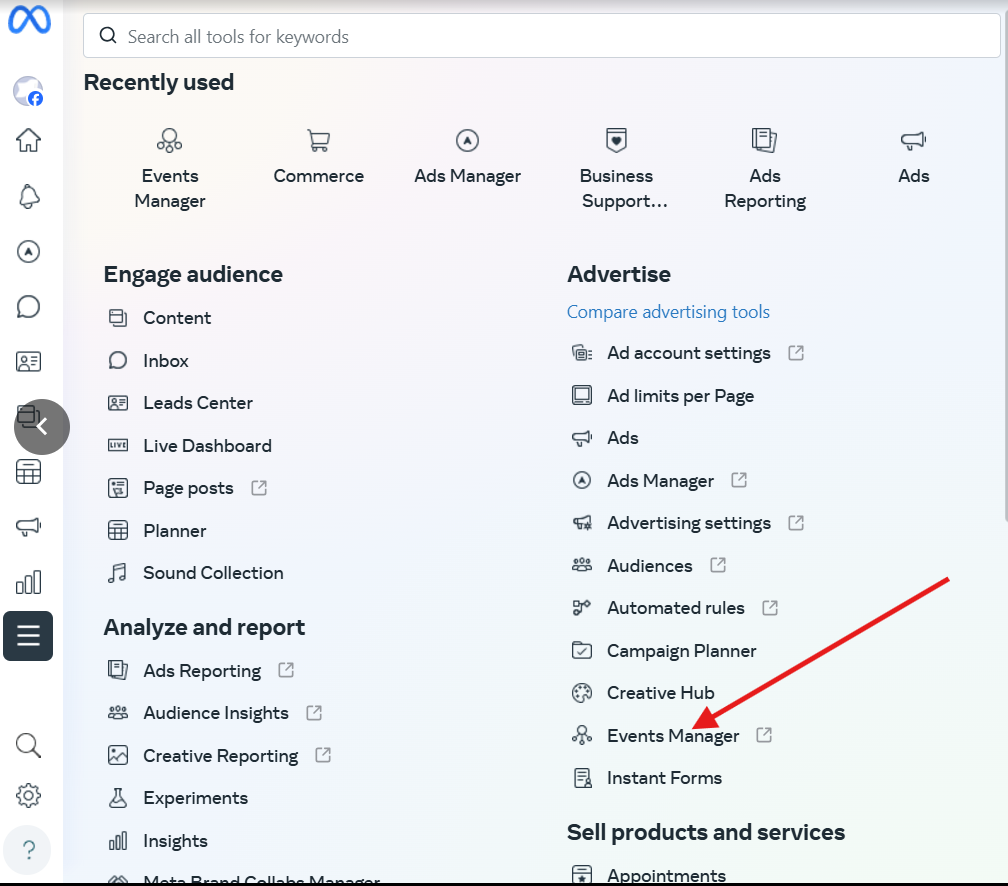
Step 1: Go to the Event Manager.
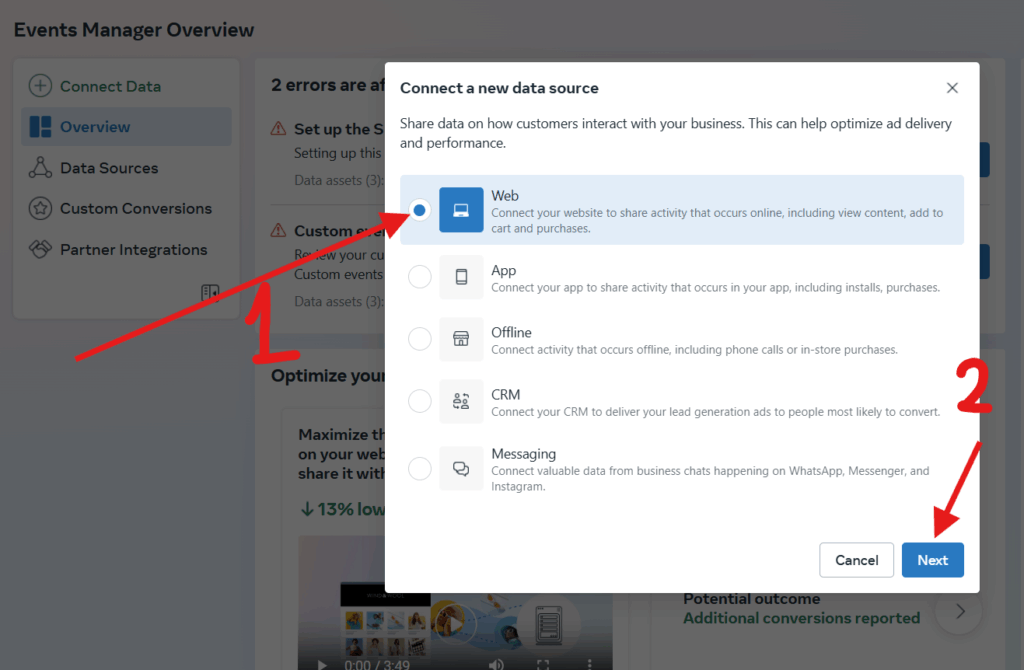
Step 2: Connect data and select Web.
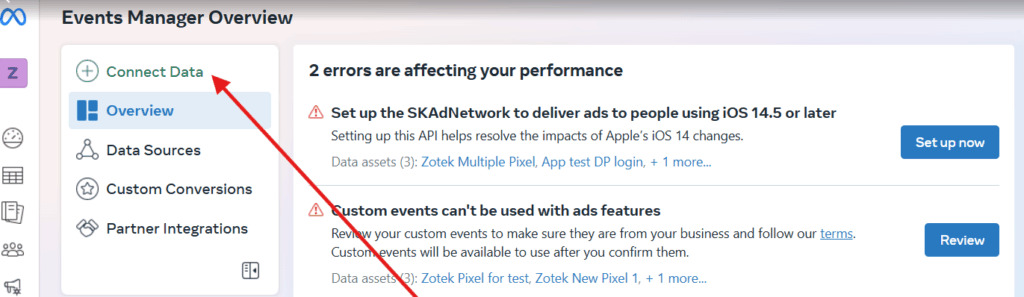
Step 3: Click connect.
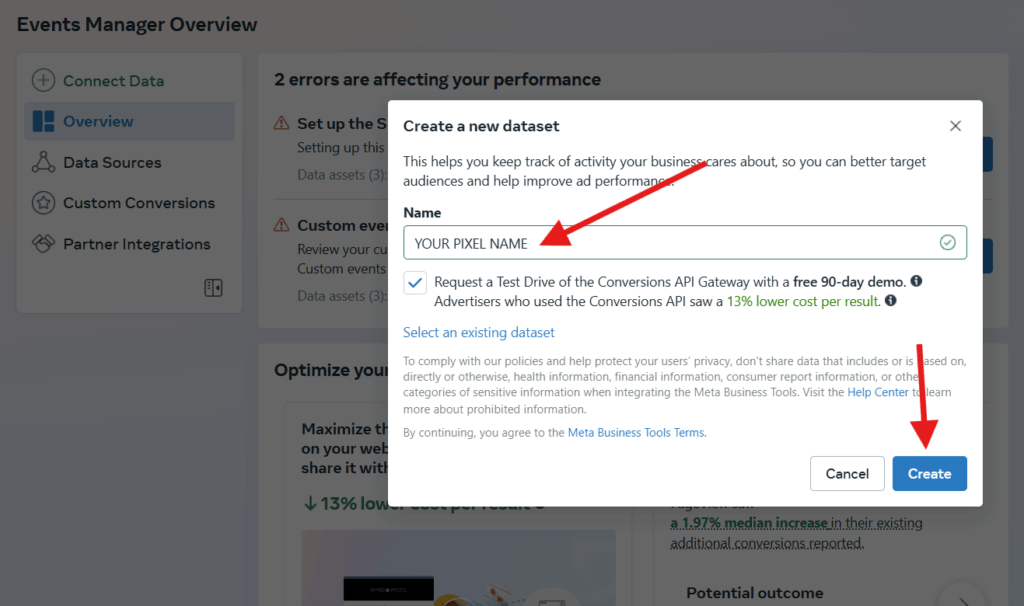
Step 4: Enter a name for your Pixel, then click Create Pixel. This creates a new ID in Events Manager.
Frequently Asked Questions (FAQs)
1. Can a personal advertising account create a Facebook Pixel?
Yes, a personal advertising account can create a Facebook Pixel, but it is limited to 1 pixel per account; the maximum is 100.
2. How do I create a Facebook Pixel?
Sign in to your Facebook Business Manager account. Navigate to Events Manager, click on “Connect Data Sources,” and select “Web” as the option. Then, choose “Facebook Pixel.” Give your Pixel a name and follow the prompts to complete the setup.
👉 Contact us for personalized recommendations or setup help!